
8.6 KiB
Anki tools for language learning
A modular collection of tools and scripts to enhance your anki-based language learning. These tools focus on listening, sentence mining, sentence decks, and more. Built for language learners and immersion enthusiasts with linux knowledge.
Tools Overview
| Tool | Purpose |
|---|---|
audio-extractor |
Extract Anki card audio by language into playlists for passive listening |
batch_importer |
Generate TTS audio from sentence lists and import into Anki |
word-scraper |
Extract & lemmatize words from Anki decks (frequency analysis, mining) |
yt-transcript |
Mine vocabulary/sentences from YouTube transcripts for analysis |
deck-converter* |
Convert TSV+audio into .apkg Anki decks using config-driven workflow |
youtube-to-anki* |
Convert YouTube subtitles/audio into fully timestamped Anki cards |
*=haven't used these tools in a very long time and will update them when I use them again
Requirements
Each tool has its own set of dependencies. Common dependencies includes
- Python3
- Anki with AnkiConnect
yt-dlp,jq,yq,spaCy,gTTS,youtube-transcript-api,pyyaml,genanki,fugashi,regex,requestsffmpeg
Personally, I like to have on venv that contains all the prerequisites.
python3.12 -m venv ~/.venv/anki-tools
source ~/.venv/anki-tools/bin/activate
python3 -m pip install -U pip
pip install gtts jq yq spacy youtube-transcript-api pyyaml genanki fugashi regex requests

# Also install ffmpeg
sudo dnf install ffmpeg
That way, whenever you want to run these scripts, you can just source the venv and run the appropriate script.
source ~/.venv/anki-tools/bin/activate
Getting started
Clone the repository:
git clone https://git.pawelsarkowicz.xyz/ps/anki-tools.git
cd anki-tools
Then explore.
Most scripts assume:
- Anki is running
- the AnkiConnect add-on is enabled (default: http://localhost:8765)
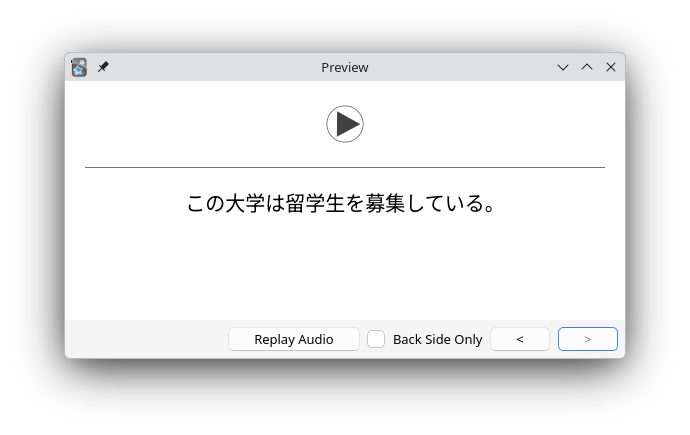
- that your anki cards are basic, with audio on the front and the sentence (in the target language) on the back. These tools only look at the first line of the back, so you can have notes/translations/etc. on the following lines if you like.

Language support
- 🇯🇵 日本語
- 🇪🇸 Español
audio-extractor
Purpose: Extract audio referenced by [sound:...] tags from Anki decks, grouped by language.
Usage:
./extract_anki_audio.py jp [--concat] [--outdir DIR] [--copy-only-new]
./extract_anki_audio.py es [--concat] [--outdir DIR] [--copy-only-new]
Outputs:
- Copies audio into
~/Languages/Anki/anki-audio/<language>/by default - Writes
<language>.m3u - With
--concat, writes<language>_concat.mp3(keeps individual files)
Requirements
- Anki + AnkiConnect
requestsffmpeg(only if you use--concat)
batch_importer
Purpose: Generate TTS audio from a sentence list and add notes to Anki via AnkiConnect.
Usage
./batch_anki_import.sh [jp|es] [--concat] [--outdir DIR]
- Keeps all individual MP3s.
- If
--concatis passed, also writes one combined MP3 for the run.
Requirements
- Anki + AnkiConnect
gtts-cli,ffmpeg,curl
Sentence files
- Japanese:
~/Languages/Anki/sentences_jp.txt - Spanish:
~/Languages/Anki/sentences_es.txt
word-scraper
Extract frequent words from Anki notes using AnkiConnect and spaCy. This is primarily intended for language learning workflows (currently Japanese and Spanish).
The script:
- queries notes from Anki
- extracts visible text from a chosen field
- tokenizes with spaCy
- filters out stopwords / grammar
- counts word frequencies
- writes a sorted word list to a text file
Requirements
- Anki + AnkiConnect - Python 3.12 (recommended; spaCy is not yet stable on 3.14)
spacy,regex,requests- spaCy models:
python -m spacy download es_core_news_sm
python -m spacy download ja_core_news_lg
Usage
./word_scraper.py {jp,es} [options]
| Option | Description |
|---|---|
--query QUERY |
Full Anki search query (e.g. deck:"Español" tag:foo) |
--deck DECK |
Deck name (repeatable). If omitted, decks are inferred from language |
--field FIELD |
Note field to read (default: Back) |
--min-freq N |
Minimum frequency to include (default: 2) |
--outdir DIR |
Output directory (default: ~/Languages/Anki/anki-words/<language>) |
--out FILE |
Output file path (default: <outdir>/words_<lang>.txt) |
--full-field |
Use full field text instead of only the first visible line |
--spacy-model MODEL |
Override spaCy model name |
--logfile FILE |
Log file path |
Examples
Basic usage (auto-detected decks)
./word_scraper.py jp
./word_scraper.py es
Specify a deck explicitly
./word_scraper.py jp --deck "日本語"
./word_scraper.py es --deck "Español"
Use a custom Anki query
./word_scraper.py es --query 'deck:"Español" tag:youtube'
Change output location and frequency threshold
./word_scraper.py jp --min-freq 3 --out words_jp.txt
./word_scraper.py es --outdir ~/tmp/words --out spanish_words.txt
Process full field text (not just first line)
./word_scraper.py jp --full-field
Output format
The output file contains one entry per line:
word frequency
Examples:
comer 12
hablar 9
行く (行き) 8
見る (見た) 6
- Spanish output uses lemmas
- Japanese output includes lemma (surface) when they differ
Language-specific notes
Japanese
- Filters out particles and common grammar
- Keeps nouns, verbs, adjectives, and proper nouns
- Requires
regexfor Unicode script matching
Spanish
- Filters stopwords
- Keeps alphabetic tokens only
- Lemmatized output
yt-transcript
Extract vocabulary or sentence-level text from YouTube video subtitles (transcripts), for language learning or analysis.
The script:
- fetches captions via
youtube-transcript-api - supports Spanish (es) and Japanese (jp)
- tokenizes Japanese using MeCab (via fugashi)
- outputs either:
- word frequency lists, or
- timestamped transcript lines
Features
- Extract full vocabulary lists with frequency counts
- Extract sentences (with timestamps or sentence indices)
- Support for Japanese tokenization
- Optional: stopword filtering
- Modular and extendable for future features like CSV export or audio slicing
Requirements
youtube-transcript-api- For Japanese tokenization:
pip install "fugashi[unidic-lite]"
Usage
./yt-transcript.py {jp,es} <video_url_or_id> [options]
Options
| Option | Description |
|---|---|
--mode {vocab,sentences} |
Output mode (default: vocab) |
--top N |
Show only the top N words (vocab mode) |
--no-stopwords |
Keep common words |
--raw |
(Spanish only) Do not lowercase tokens |
Examples
Extract Spanish vocabulary
./yt-transcript.py es https://youtu.be/VIDEO_ID
Top 50 words
./yt-transcript.py es VIDEO_ID --top 50
Japanese transcript with timestamps
./yt-transcript.py jp VIDEO_ID --mode sentences
Keep Spanish casing and stopwords
./yt-transcript.py es VIDEO_ID --raw --no-stopwords
Output formats
Vocabulary mode
palabra: count
Example:
comer: 12
hablar: 9
Sentence mode
[12.34s] sentence text here
Example:
[45.67s] 今日はいい天気ですね
Language Notes
Spanish
- Simple regex-based tokenizer
- Accented characters supported
- Lowercased by default
Japanese
- Uses fugashi (MeCab)
- Outputs surface forms
- Filters via stopword list only (no POS filtering)
License
This project is licensed under the MIT License.
See the LICENSE file for details.